
In-Depth Review of the Apple AirTag: Is It Worth the Hype?

In-Depth Review of the Apple AirTag: Is It Worth the Hype?

You rely on small everyday items — keys, a wallet, a bag — and losing them costs time and stress. The Apple AirTag (Single Pack) promises a simple way to keep track of those things by tying into your iPhone or iPad and the Find My network.

In this review you’ll learn how the AirTag works, why its precision finding and wide device network matter, and whether it delivers practical benefits like faster recovery, less worry, and seamless setup.

TL;DR

Feature

Verdict

⏱️ Ease of Use

⭐️⭐️⭐️⭐️⭐️ – One‑tap setup with iPhone/iPad and seamless Find My integration make it effortless to start tracking.

🔍 Tracking Accuracy

⭐️⭐️⭐️⭐️ – Precision Finding is excellent nearby; remote location relies on the Find My network of other Apple devices.

🔋 Battery Life

⭐️⭐️⭐️⭐️ – Long‑lasting, user‑replaceable CR2032 battery that you can swap without special tools.

🔒 Compatibility & Privacy

⭐️⭐️⭐️⭐️ – Strong privacy features and anti‑stalking measures; works best within the Apple ecosystem.

🎛️ Build & Durability

⭐️⭐️⭐️⭐️ – Compact, lightweight, water and dust resistant; fits many use cases from keys to luggage.

Apple AirTag (Single Pack)

Keep track of and find your keys, wallet, luggage, backpack, and more. Simple one-tap setup with iPhone or iPad. Single style.

If you misplace things all the time, the Apple AirTag (Single Pack) feels like a tiny, reliable helper you can stick on whatever matters. You pair it to your iPhone or iPad with one tap, attach it to keys, slip it into a bag, or tuck it into luggage, and the Find My app does the rest.

Nearby Precision Finding points you right to an item on supported iPhone models, while the broader Find My network helps locate things that wander farther away. It’s small, lightweight, water and dust resistant, and the battery is user-replaceable and lasts over a year, so once you set one up you mostly forget about it — until you need it.

For day-to-day lost-then-found moments and for travel or crowded places where items can get separated, it’s a simple, low-fuss way to stop the frantic searching and get back to your day.

What People Say

Customers consistently praise how easy the AirTag is to set up and how reliably it helps locate lost items. People often note the precision finding, long battery life, and tiny form factor as major pluses, and many also appreciate how the Find My network can help recover items that aren’t nearby. A common caveat mentioned is that it doesn’t have its own GPS, so it relies on other devices to update location when out of Bluetooth range.

Overall Sentiment: Positive

Sentiment Analysis Chart

Pros

Cons

Seamless integration with Apple devices

No built-in GPS — updates rely on nearby Apple devices

Highly accurate short-range locating on supported iPhones

Limited functionality for Android users

Long-lasting, replaceable battery

Requires a case or holder to attach to some items

Very compact and easy to attach or hide

Use Cases

Situation

How It Helps

Keys at Home

You can make your keys play a sound or use Precision Finding to follow on-screen arrows to the exact spot in a room.

Airport Travel

Slip one in your checked bag to get location updates via the Find My network if luggage gets separated, reducing stress at busy terminals.

Kids’ Backpacks

It’s small enough to hide in a pocket and shareable with family, so you can quickly see a last-known location if a backpack goes missing.

Everyday Gear (bike, bag, pet collar)

Lightweight design and water resistance make it practical for outdoor use while the network increases chances of recovery if something is left behind.

Ease Of Use

Feature

Ease Level

Setup

Very Easy

Pairing with Find My

Very Easy

Precision Finding

Easy

Battery Replacement

Moderate

Problem Solving

The AirTag solves the everyday problem of misplaced items by giving you a reliable way to locate things quickly, either nearby with Precision Finding or farther away via the Find My network. It reduces blind searching and repeated replacement of lost items, and for many people it simply cuts down the small-but-frequent stress of losing keys, bags, or other essentials.

Travel Friendliness

AirTag is travel-friendly: it’s compact, durable, and fits easily into luggage or a carry-on. While it can’t provide live GPS tracking, the Find My network often provides helpful location updates at airports and transit hubs when other Apple devices are nearby.

Key Benefits

  • One-tap setup with iPhone/iPad for fast pairing
  • Precision Finding with Ultra Wideband on supported iPhones
  • Works with the massive Find My network for far-away recovery
  • Small, lightweight, IP67 water and dust resistant
  • User-replaceable battery that lasts over a year

Rating: 4.7 (total: 46446+)

Shop Now

FAQ

How Does The Apple AirTag (Single Pack) Work And Will It Help You Find Lost Items?

You set up the Apple AirTag (Single Pack) with a one-tap pairing to your iPhone or iPad and manage it through the Find My app; it uses Bluetooth to communicate with your device and leverages the Find My network of nearby Apple devices to report location when it’s out of range. You can play a sound to locate nearby tags and use Precision Finding with a U1‑equipped iPhone for very accurate, on‑foot directions to a nearby AirTag. Remember that AirTag does not have its own GPS or cellular connection, so it won’t provide continuous, real‑time tracking if no other Apple devices are nearby.

Practical tips: give the AirTag a clear name in Find My, enable Lost Mode when needed, keep Bluetooth and location services enabled on your phone, and place the tag in or on the item where a sound will be audible and the Bluetooth signal can reach surrounding devices.

Is The AirTag A Good Choice For Pets, Children, And Luggage?

You can use an AirTag on pets, children’s bags, and luggage for last‑known locations and short‑range finding, but it’s important to know the limits: the device is not a real‑time GPS tracker and updates depend on other Apple devices coming into range. The AirTag is water and dust resistant, so it handles typical travel and outdoor conditions, and it’s compact and light enough to fit in collars or luggage compartments. Practical advice: use a secure, comfortable holder designed for collars if you attach it to an animal, place it inside luggage pockets for airport tracking, check the tag’s position periodically so you can hear the speaker if you need to find it, and choose a dedicated GPS tracker instead if you need continuous, live location monitoring for pets or people.

What Privacy, Safety, And Battery Considerations Should You Be Aware Of?

You should be aware that AirTags include built‑in anti‑stalking measures: iPhones will notify you about unknown nearby tags moving with you, and unattended AirTags will emit an audible alert after a period of separation to help prevent unwanted tracking. Each AirTag is tied to a single Apple ID, so you can’t anonymously switch ownership without removing it from that account.

The AirTag uses a replaceable CR2032 battery that typically lasts months; you can replace it yourself by twisting the back cover and popping in a new cell, and you should check the battery status in the Find My app so you’re not surprised. For best results, keep your device software up to date, remove an AirTag from your account before giving it away, and respect privacy and legal considerations when tracking items that belong to other people.

Why Choose AirTag

You choose the Apple AirTag because it plugs directly into the Apple ecosystem and Find My network, giving you fast, reliable location updates and Precision Finding with U1-equipped iPhones, plus easy one-tap setup. Its small, durable design, replaceable battery and built-in privacy controls make a single AirTag a low-friction, trustworthy solution for keeping track of keys, bags, or other everyday items.
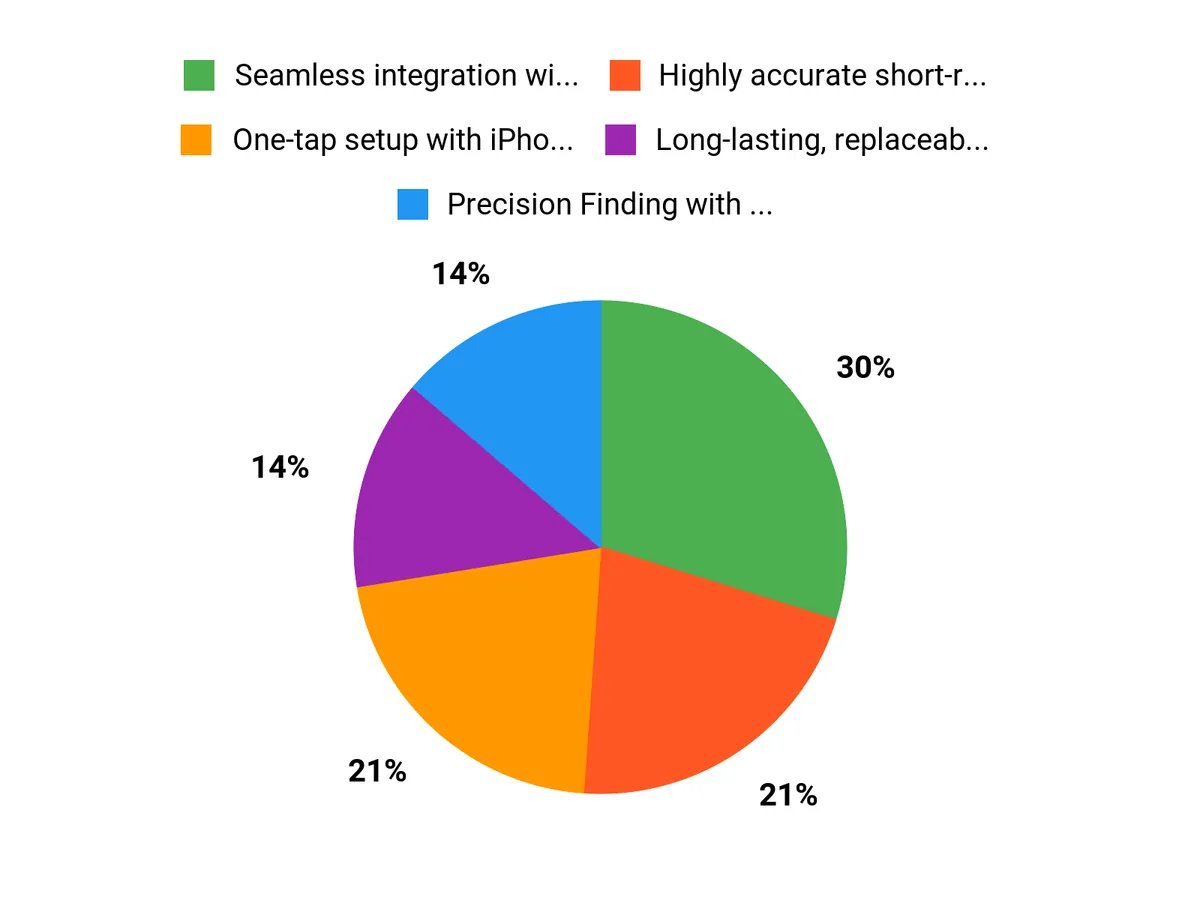
Why Choose AirTag Chart

Wrapping Up

If you use an iPhone or iPad, the Apple AirTag (Single Pack) is a practical way to reduce wasted time and anxiety over lost items. The device offers one‑tap setup, accurate precision finding nearby, long battery life with a user‑replaceable CR2032, and discreet, durable design suitable for keys, bags, and luggage. Keep in mind it is not a standalone GPS tracker — remote location updates depend on the Find My network — and its benefits are strongest if you’re already in the Apple ecosystem.

For quick, reliable item recovery and everyday peace of mind, the AirTag is a sensible choice.


Comments

Popular posts from this blog

Why Unencrypted DNS Still Rules and How You Can Break Free

Ever stumbled across a detail online that made you stop mid-scroll, like learning that the majority of your internet queries are still open to prying eyes? For years, I assumed the modern web meant modern privacy. Then, a coffee shop chat with a network engineer friend turned my assumptions upside down: "Most folks have HTTPS, but their DNS is still as open as a library book." That revelation hit hard. In today’s data-driven world, understanding how your DNS traffic is handled—and how to encrypt it—might be the most overlooked privacy step. Here’s what’s really going on, and how you can (finally) take control. The Curious Case of Unencrypted DNS: Why It Still Dominates In an era where HTTPS is nearly universal and most web traffic is encrypted, it’s surprising how many people still rely on unencrypted DNS. This creates real DNS privacy risks, exposing users to ISP DNS monitoring and ...

Why we should use a VPN

  Benefits of VPN and why use a VPN? Protect your privacy: When you connect to the internet, your internet service provider (ISP) can track and monitor your online activities. Using a VPN encrypts your internet connection, making it impossible for your ISP to track and monitor your online activities. Secure public Wi-Fi: Public Wi-Fi is a common target for hackers and cybercriminals. By using a VPN, you can secure your internet connection and protect your data from being intercepted on public Wi-Fi networks. Access geo-restricted content: Some websites and services are restricted to specific countries or regions. A VPN allows you to change your virtual location, allowing you to access these geo-restricted websites and services. Bypass censorship: Some countries censor certain websites and online content. A VPN can help you bypass censorship and access restricted content. Best VPNs to Use: NordVPN: NordVPN is a popular VPN service that offers fast, secure, and reliable connections. ...

Beginner’s Guide to Programming

 -The Beginner’s Guide to Programming Table Of Contents   Chapter 1: Understanding Programming Concepts And How They Work Chapter 2: Techniques Of Writing A Program  Chapter 3: The List Of Programming Languages  Chapter 4: How To Choose The Right Compiler  Chapter 5: What Is An Interpreter  Chapter 6: Writing Your Program With An Editor  Chapter 7: The Functions Of A Debugger  Chapter 8: Ease Your Burden With Components  Chapter 9: Optimizing Your Program With Profiler  Chapter 10: Installing Your Program. Wrapping Up   Foreword  There are several different concepts that an individual needs to understand before being able to tackle the issue of programming concepts and how they unfold.  Introduction: Programming is the act of designing, writing, testing, and maintaining the source code for computer programs.  Programming is a field that requires knowledge in mathematics, logic, sciences, and engineering.  Th...

Spyware Removal Tricks and Advice

-Spyware Removal Tricks and Advice Contents Chapter 1 What is Spyware?  Chapter 2 How is Spyware different from  Viruses &Worms? Chapter 3 Can I Just Ignore Spyware?  Chapter 4 What Damage Can Spyware Do?  Chapter 5 How does Spyware Get onto Your Computer?  Chapter 6 How to Prevent Spyware  Chapter 7 What is Antispyware & How Does it Work?  Chapter 8 Can I Use “All-Around” Computer Security Software?  Chapter 9 Free Antispyware Software  Chapter 10 Rogue Antispyware Software  Chapter 11 Choosing Antispyware Software Chapter 12 Do You Need to Update Antispyware?  Chapter 13 How to Get Rid of Spyware  Chapter 14 Spyware Removal in Safe Mode  Chapter 15 Manual Removal of Spyware  Chapter 16 Manual Spyware Removal without Instructions  Chapter 17 Combating Browser Hijackers  Chapter 18: Spyware that Prevents You from Running Antispyware  Chapter 19 Spyware that Prevents You From Starting in Safe Mod...

Computer Technology Overview

- Computer Technology: An Overview of Laptops, Desktops, Tablets, and Cell Phones Computer technology has come a long way since its inception. The modern world is now dominated by a wide range of computing devices, from laptops and desktops to tablets and cell phones. These devices have transformed the way we live, work, and interact with each other. In this blog, we'll take a look at the different types of computer technology and how they've evolved over the years. Laptops: Portable Powerhouses Laptops are the most versatile computing devices. They offer the convenience of a desktop computer and the portability of a tablet. Over the years, laptops have become smaller, lighter, and more powerful, making them the perfect device for people on the go. Today, laptops are equipped with high-end hardware and software, making them suitable for tasks such as video editing, gaming, and even scientific research. Desktops: The Workhorses Desktops are traditional computing devices that hav...

Buying Refurbished Computers. What you need to know.

-Buying Refurbished Computers Refurbished products are those that have been fixed or repaired and sold to consumers at a lower price than new products. Refurbished goods help the environment because it means less wasted materials and less energy used. Refurbished computers come with all the same parts as a new computer, but they may also be missing some of the extras like a mouse or keyboard. Refurbished electronics can include anything from MP3 players to microwaves. When buying refurbished items, make sure to check what is included in the package before you buy it. They are a great way to save money and help the environment because these devices can be recycled at the end of life. The biggest difference between used, open-box, and refurbished is that refurbished products come with a warranty in some cases, or in some cases, they might even come with new parts. The benefit of buying refurbished electronics is that you can purchase these items at low prices while still getting access t...

Mac vs Windows OS

- The Mac operating system (OS) and Windows OS are two of the most popular operating systems in the world, used by millions of people every day. Although they both perform the same basic functions, there are several key differences between the two that set them apart from one another. User interface: The most obvious difference between the two operating systems is their user interface. Mac OS has a cleaner, more minimalist look, with a focus on simplicity and ease of use. Windows OS, on the other hand, is more customizable, allowing users to personalize the look and feel of their system. Software compatibility: Mac OS is limited in terms of software compatibility, as it only runs on Apple hardware and is limited to a smaller number of applications compared to Windows OS. Windows OS, on the other hand, is much more versatile, allowing users to run a wider range of software and hardware. Hardware: Mac OS is only available on Apple hardware, while Windows OS can be installed on a wide ran...

Future of Technology and Computers

- In recent years, technology has made incredible advances and continues to shape the world we live in. Computers have played a major role in this progress and have revolutionized the way we live, work, and communicate. From desktops to laptops, from cell phones to smartwatches, computers have become an integral part of our daily lives. In this blog, we'll take a look at the future of technology with computers and what we can expect in the coming years. Cell Phones and Laptops Cell phones and laptops are two of the most widely used computer devices today. As technology continues to advance, we can expect these devices to become even more powerful and versatile. For example, cell phones are becoming increasingly more capable of handling complex computing tasks and are being used for more than just making calls and sending messages. In the future, we can expect cell phones to be used for virtual reality and augmented reality experiences, as well as for advanced gaming and entertainme...

Best Cell Phone Review 2023

- The world of smartphones is constantly evolving, with new models and features being released every year. This can make it challenging to decide on the best cell phone for personal use. However, there are certain brands and models that stand out as the best options for most people. Here is a list of the best cell phones for personal use in 2023. iPhone 12 Pro Max: Apple's latest iPhone is a top-of-the-line device that offers an impressive array of features and a sleek design. The Pro Max model boasts a large 6.7-inch OLED display, a powerful A15 Bionic chip, and a triple-camera setup that includes a 12-megapixel ultra-wide, wide, and telephoto lenses. With 5G support and excellent battery life, this is a great choice for anyone looking for a high-end smartphone. Samsung Galaxy S21 Ultra: Samsung's latest flagship smartphone offers cutting-edge technology and a large, high-resolution display. The S21 Ultra features a 6.8-inch Dynamic AMOLED screen, 5G support, and a powerful Ex...

Windows 10 and 11 Operating System Speed Tweaks

 - Windows 10 and 11 are two of the most popular operating systems in the world, and both are designed to be fast and responsive. However, as with any software, over time, the speed and performance of Windows 10 and 11 can begin to degrade. This can be caused by a variety of factors, such as hardware limitations, system updates, or a cluttered hard drive. If you're experiencing slow performance on your Windows 10 or 11 machine, there are several tweaks and tips you can use to improve speed and response time. Here are a few of the most effective ways to speed up your Windows operating system: Disable Startup Programs: Over time, you may have installed various software and applications that launch automatically when your computer starts. This can slow down the boot process and consume system resources, leading to decreased performance. You can use Task Manager to disable these startup programs, which will free up memory and improve performance. Uninstall Unused Programs: Uninstalling...