
In-Depth Review Of The New Apple AirPods 4 Wireless Earbuds

In-Depth Review Of The New Apple AirPods 4 Wireless Earbuds

Choosing the right earbuds affects how you work, commute, exercise, and enjoy media. The Apple AirPods 4 Wireless Earbuds combine active noise cancellation, Personalized Spatial Audio, and a USB‑C charging case to deliver a polished, modern listening experience.

In this review you’ll learn how these earbuds perform across sound, comfort, battery life, and smart features so you can decide if they match your daily needs. Expect improved noise control without in‑ear tips, deep integration with Apple devices, and a lightweight design built for all‑day wear.

TL;DR

Feature

Verdict

Ease of Use

⭐️⭐️⭐️⭐️⭐️ – Seamless pairing with Apple devices and intuitive controls; Siri voice control makes hands‑free tasks effortless 🔍

Sound Quality

🔊 – Balanced, detailed audio with strong low end and Personalized Spatial Audio for an immersive feel

Noise Cancellation

🔇 – Impressive ANC for an open‑fit earbud; reduces ambient hums effectively though not as isolating as sealed tips

Battery & Charging

⏱️ – Up to 5 hours per charge and up to 30 hours with the USB‑C case; fast‑charge provides around 1 hour of listening from 5 minutes in the case

Comfort & Fit

⭐️⭐️⭐️⭐️ – Lightweight, secure, and comfortable for long sessions for many users, but fit can vary by ear shape 🎧

AirPods 4

Apple AirPods 4 Wireless Earbuds with Active Noise Cancellation, Adaptive Audio, Personalized Spatial Audio, USB-C Charging Case, Wireless Charging, H2 Chip.

If you like AirPods but wanted better noise control and a comfier fit, the Apple AirPods 4 Wireless Earbuds should feel familiar and noticeably upgraded. You get software-driven Active Noise Cancellation, Adaptive Audio that blends ANC and Transparency, and personalized Spatial Audio for a wider soundstage — all powered by the H2 chip.

They’re small and light, so they’re great for commuting, long work calls, or zoning into a playlist at the gym, and the tiny USB‑C charging case slips into a pocket without fuss. Setup is the usual plug‑and‑play Apple experience, so if you’re already in the ecosystem you’ll appreciate how smoothly they pair and hand off between devices.

If you want a comfortable, versatile pair of earbuds that balance solid ANC and open-ear comfort, these are worth considering.

What People Say

Customers often praise the blend of strong noise cancellation and an open, comfy fit that doesn’t force a seal. People also mention noticeably improved sound and clear call quality, plus the H2-powered features like Adaptive Audio and Personalized Spatial Audio. A few users note the fit can be hit-or-miss depending on ear shape, but most appreciate the stability and lightweight feel.

Overall Sentiment: Positive

Sentiment Analysis Chart

Pros

Cons

Balanced, detailed sound with good bass

Open-fit design may not seal for every ear, reducing passive isolation

Impressive ANC for an open-fit earbud

Some users report occasional looseness during movement

Seamless pairing and Siri integration

Advanced features are most useful within the Apple ecosystem

Compact USB‑C charging case and wireless charging

IP54 dust, sweat, and water resistance

When To Use

Situation

How It Helps

Commuting

ANC reduces background noise on buses and trains while Conversation Awareness lets you hear announcements without removing the buds.

Work Calls

Voice Isolation and dual beamforming mics make your voice clearer to others, and the comfy fit means you can keep them on for long meetings.

Exercise

IP54 rating and a secure fit keep them resilient against sweat and light rain, plus the case is small enough to stash in a gym bag.

Travel

Personalized Spatial Audio and long total battery life make movies and playlists feel more immersive during flights or long drives.

Controls & Setup

Feature

Ease Level

Setup & Pairing

Very Easy

Touch Controls

Easy

Siri & Voice

Very Easy

Charging (USB‑C/Wireless)

Easy

Firmware Updates

Automatic

Versatility

You can use them for everything from phone calls and podcasts to movies and gym sessions; they work best if you’re invested in Apple devices but remain fully functional with other Bluetooth gear.

Comfort

Redesigned contours and a shorter stem make them noticeably more comfortable for long sessions than many in-ear tips, and the open fit reduces that sealed‑pressure feeling some people dislike.

Why You'll Like Them

  • Comfortable open-fit design for long wear
  • Effective software-driven Active Noise Cancellation
  • Personalized Spatial Audio for immersive listening
  • Fast pairing and strong Apple ecosystem integration
  • Small USB-C charging case with decent battery life

Rating: 4.5 (total: 12450+)

Shop Now

FAQ

How Is The Fit, Comfort, And Noise Cancellation?

You’ll find the Apple AirPods 4 Wireless Earbuds use an open‑ear design rather than silicone tips, so comfort is often better for long wear but the seal won’t match in‑ear models. The Active Noise Cancellation driven by the H2 chip and software does an excellent job reducing steady background noise like trains and airplanes, though louder voices and very sharp noises may still be audible.

To get the best fit and cancellation, position each bud gently in the ear canal and make sure sensors are clear; update firmware regularly and enable Adaptive Audio and Personalized Spatial Audio for a tuned experience. If you need complete physical isolation, consider in‑ear options, but if you want long comfort with strong software ANC and excellent sound, these are a solid choice.

What Battery Life, Charging Options, And Daily Usage Can You Expect?

With the Apple AirPods 4 Wireless Earbuds you can expect about 5 hours of listening time on a single charge and up to 30 hours of total listening time with the USB‑C Charging Case. A 5‑minute charge in the case provides around 1 hour of listening or around 45 minutes of talk time, the case uses a USB‑C connector and wireless charging is supported; note the USB‑C charge cable is sold separately.

For everyday use, enable Adaptive EQ and Personalized Spatial Audio only when you want them to save power, keep the case charged, avoid extreme temperatures, and use the built‑in optimized charging features to preserve battery health. Remember the buds are IP54 rated for dust, sweat, and water resistance so you can use them during workouts or light rain, but avoid submerging them and clean them with a soft, dry cloth.

Are They Compatible With Non‑Apple Devices And How Is Call And Connectivity Performance?

You can pair the Apple AirPods 4 Wireless Earbuds with Android or other Bluetooth devices using Bluetooth 5.3, but you’ll get the deepest integration with Apple devices (instant pairing, automatic device switching, Siri, and Personalized Spatial Audio). Call quality is strong thanks to dual beamforming and speech‑detecting microphones and features like Voice Isolation, though microphone performance also depends on network and how you position the stems; for clearer calls keep the mic area clean and point the stem slightly toward your mouth.

If you experience connection hiccups, toggle Bluetooth, forget and re‑pair the earbuds, or reset them via the case; firmware updates can also fix latency or stability issues, and using Bluetooth 5.3 devices helps deliver the best range and lower latency.

Why Choose AirPods 4

You choose AirPods 4 because they deliver richer, more detailed sound with improved active noise cancellation and spatial audio while staying comfortable for long wear, plus reliable call quality and adaptive EQ that tailors audio to your ears. They also offer seamless Apple ecosystem integration—instant pairing, MagSafe charging, Find My and hands‑free Siri—so you get a convenient, polished experience that most users prioritize when picking premium wireless earbuds.
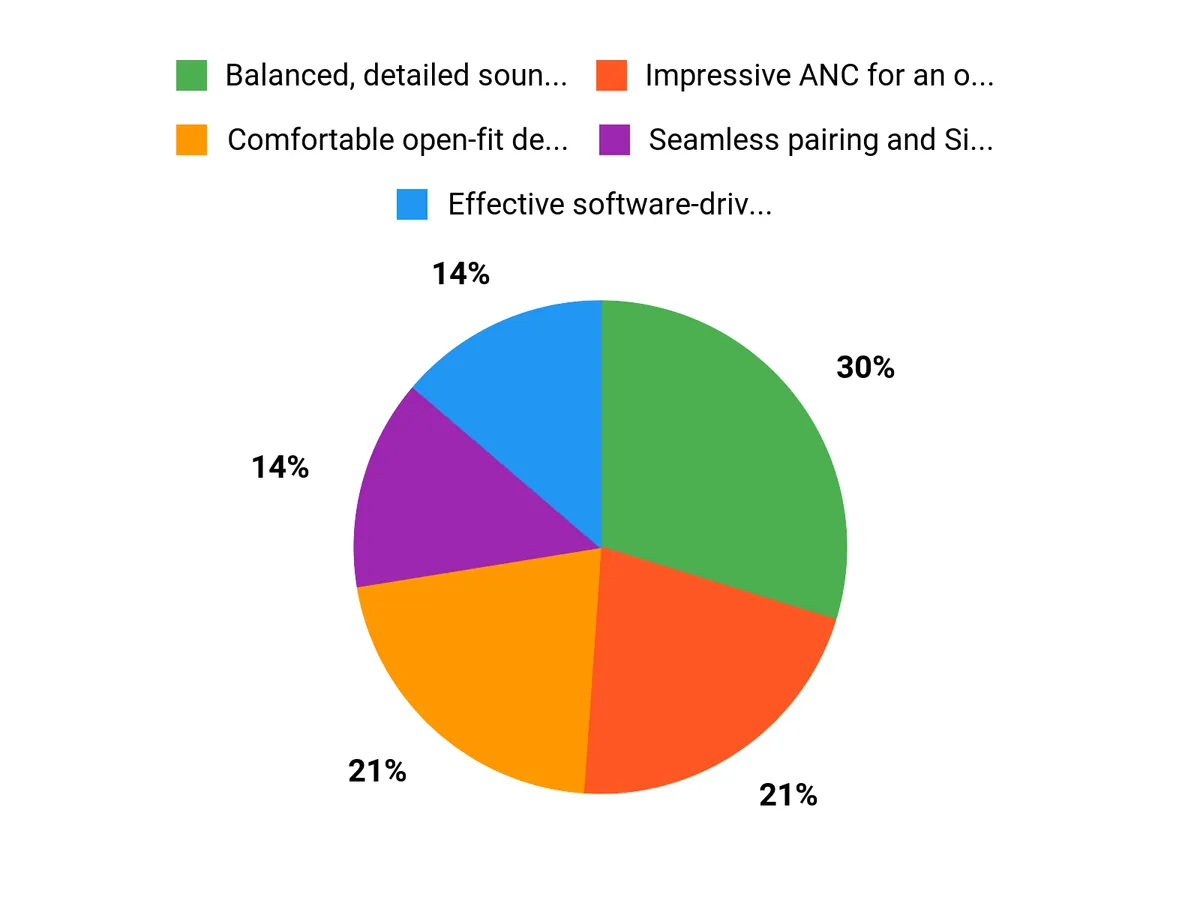
Why Choose AirPods 4 Chart

Wrapping Up

The Apple AirPods 4 Wireless Earbuds deliver a refined, modern listening package that will appeal especially to people already invested in the Apple ecosystem. If you prioritize comfort and convenience, you’ll appreciate the lightweight, open‑fit design and seamless device pairing. The active noise cancellation is notably effective for non‑sealed earbuds, and Personalized Spatial Audio adds convincing depth for movies and music. Battery life covers a full day of typical use when you factor in the USB‑C charging case, and fast charging is handy when you need a quick top‑up. Be aware that the open design means the deepest possible ANC from sealed silicone tips won’t be matched, and the included charging cable is sold separately.

Overall, these AirPods are a strong choice when you want excellent sound, robust smart features, and comfortable all‑day wear without the feel of in‑ear tips.


Comments

Popular posts from this blog

Why Unencrypted DNS Still Rules and How You Can Break Free

Ever stumbled across a detail online that made you stop mid-scroll, like learning that the majority of your internet queries are still open to prying eyes? For years, I assumed the modern web meant modern privacy. Then, a coffee shop chat with a network engineer friend turned my assumptions upside down: "Most folks have HTTPS, but their DNS is still as open as a library book." That revelation hit hard. In today’s data-driven world, understanding how your DNS traffic is handled—and how to encrypt it—might be the most overlooked privacy step. Here’s what’s really going on, and how you can (finally) take control. The Curious Case of Unencrypted DNS: Why It Still Dominates In an era where HTTPS is nearly universal and most web traffic is encrypted, it’s surprising how many people still rely on unencrypted DNS. This creates real DNS privacy risks, exposing users to ISP DNS monitoring and ...

Why we should use a VPN

  Benefits of VPN and why use a VPN? Protect your privacy: When you connect to the internet, your internet service provider (ISP) can track and monitor your online activities. Using a VPN encrypts your internet connection, making it impossible for your ISP to track and monitor your online activities. Secure public Wi-Fi: Public Wi-Fi is a common target for hackers and cybercriminals. By using a VPN, you can secure your internet connection and protect your data from being intercepted on public Wi-Fi networks. Access geo-restricted content: Some websites and services are restricted to specific countries or regions. A VPN allows you to change your virtual location, allowing you to access these geo-restricted websites and services. Bypass censorship: Some countries censor certain websites and online content. A VPN can help you bypass censorship and access restricted content. Best VPNs to Use: NordVPN: NordVPN is a popular VPN service that offers fast, secure, and reliable connections. ...

Beginner’s Guide to Programming

 -The Beginner’s Guide to Programming Table Of Contents   Chapter 1: Understanding Programming Concepts And How They Work Chapter 2: Techniques Of Writing A Program  Chapter 3: The List Of Programming Languages  Chapter 4: How To Choose The Right Compiler  Chapter 5: What Is An Interpreter  Chapter 6: Writing Your Program With An Editor  Chapter 7: The Functions Of A Debugger  Chapter 8: Ease Your Burden With Components  Chapter 9: Optimizing Your Program With Profiler  Chapter 10: Installing Your Program. Wrapping Up   Foreword  There are several different concepts that an individual needs to understand before being able to tackle the issue of programming concepts and how they unfold.  Introduction: Programming is the act of designing, writing, testing, and maintaining the source code for computer programs.  Programming is a field that requires knowledge in mathematics, logic, sciences, and engineering.  Th...

Spyware Removal Tricks and Advice

-Spyware Removal Tricks and Advice Contents Chapter 1 What is Spyware?  Chapter 2 How is Spyware different from  Viruses &Worms? Chapter 3 Can I Just Ignore Spyware?  Chapter 4 What Damage Can Spyware Do?  Chapter 5 How does Spyware Get onto Your Computer?  Chapter 6 How to Prevent Spyware  Chapter 7 What is Antispyware & How Does it Work?  Chapter 8 Can I Use “All-Around” Computer Security Software?  Chapter 9 Free Antispyware Software  Chapter 10 Rogue Antispyware Software  Chapter 11 Choosing Antispyware Software Chapter 12 Do You Need to Update Antispyware?  Chapter 13 How to Get Rid of Spyware  Chapter 14 Spyware Removal in Safe Mode  Chapter 15 Manual Removal of Spyware  Chapter 16 Manual Spyware Removal without Instructions  Chapter 17 Combating Browser Hijackers  Chapter 18: Spyware that Prevents You from Running Antispyware  Chapter 19 Spyware that Prevents You From Starting in Safe Mod...

Computer Technology Overview

- Computer Technology: An Overview of Laptops, Desktops, Tablets, and Cell Phones Computer technology has come a long way since its inception. The modern world is now dominated by a wide range of computing devices, from laptops and desktops to tablets and cell phones. These devices have transformed the way we live, work, and interact with each other. In this blog, we'll take a look at the different types of computer technology and how they've evolved over the years. Laptops: Portable Powerhouses Laptops are the most versatile computing devices. They offer the convenience of a desktop computer and the portability of a tablet. Over the years, laptops have become smaller, lighter, and more powerful, making them the perfect device for people on the go. Today, laptops are equipped with high-end hardware and software, making them suitable for tasks such as video editing, gaming, and even scientific research. Desktops: The Workhorses Desktops are traditional computing devices that hav...

Buying Refurbished Computers. What you need to know.

-Buying Refurbished Computers Refurbished products are those that have been fixed or repaired and sold to consumers at a lower price than new products. Refurbished goods help the environment because it means less wasted materials and less energy used. Refurbished computers come with all the same parts as a new computer, but they may also be missing some of the extras like a mouse or keyboard. Refurbished electronics can include anything from MP3 players to microwaves. When buying refurbished items, make sure to check what is included in the package before you buy it. They are a great way to save money and help the environment because these devices can be recycled at the end of life. The biggest difference between used, open-box, and refurbished is that refurbished products come with a warranty in some cases, or in some cases, they might even come with new parts. The benefit of buying refurbished electronics is that you can purchase these items at low prices while still getting access t...

Mac vs Windows OS

- The Mac operating system (OS) and Windows OS are two of the most popular operating systems in the world, used by millions of people every day. Although they both perform the same basic functions, there are several key differences between the two that set them apart from one another. User interface: The most obvious difference between the two operating systems is their user interface. Mac OS has a cleaner, more minimalist look, with a focus on simplicity and ease of use. Windows OS, on the other hand, is more customizable, allowing users to personalize the look and feel of their system. Software compatibility: Mac OS is limited in terms of software compatibility, as it only runs on Apple hardware and is limited to a smaller number of applications compared to Windows OS. Windows OS, on the other hand, is much more versatile, allowing users to run a wider range of software and hardware. Hardware: Mac OS is only available on Apple hardware, while Windows OS can be installed on a wide ran...

Future of Technology and Computers

- In recent years, technology has made incredible advances and continues to shape the world we live in. Computers have played a major role in this progress and have revolutionized the way we live, work, and communicate. From desktops to laptops, from cell phones to smartwatches, computers have become an integral part of our daily lives. In this blog, we'll take a look at the future of technology with computers and what we can expect in the coming years. Cell Phones and Laptops Cell phones and laptops are two of the most widely used computer devices today. As technology continues to advance, we can expect these devices to become even more powerful and versatile. For example, cell phones are becoming increasingly more capable of handling complex computing tasks and are being used for more than just making calls and sending messages. In the future, we can expect cell phones to be used for virtual reality and augmented reality experiences, as well as for advanced gaming and entertainme...

Best Cell Phone Review 2023

- The world of smartphones is constantly evolving, with new models and features being released every year. This can make it challenging to decide on the best cell phone for personal use. However, there are certain brands and models that stand out as the best options for most people. Here is a list of the best cell phones for personal use in 2023. iPhone 12 Pro Max: Apple's latest iPhone is a top-of-the-line device that offers an impressive array of features and a sleek design. The Pro Max model boasts a large 6.7-inch OLED display, a powerful A15 Bionic chip, and a triple-camera setup that includes a 12-megapixel ultra-wide, wide, and telephoto lenses. With 5G support and excellent battery life, this is a great choice for anyone looking for a high-end smartphone. Samsung Galaxy S21 Ultra: Samsung's latest flagship smartphone offers cutting-edge technology and a large, high-resolution display. The S21 Ultra features a 6.8-inch Dynamic AMOLED screen, 5G support, and a powerful Ex...

Windows 10 and 11 Operating System Speed Tweaks

 - Windows 10 and 11 are two of the most popular operating systems in the world, and both are designed to be fast and responsive. However, as with any software, over time, the speed and performance of Windows 10 and 11 can begin to degrade. This can be caused by a variety of factors, such as hardware limitations, system updates, or a cluttered hard drive. If you're experiencing slow performance on your Windows 10 or 11 machine, there are several tweaks and tips you can use to improve speed and response time. Here are a few of the most effective ways to speed up your Windows operating system: Disable Startup Programs: Over time, you may have installed various software and applications that launch automatically when your computer starts. This can slow down the boot process and consume system resources, leading to decreased performance. You can use Task Manager to disable these startup programs, which will free up memory and improve performance. Uninstall Unused Programs: Uninstalling...