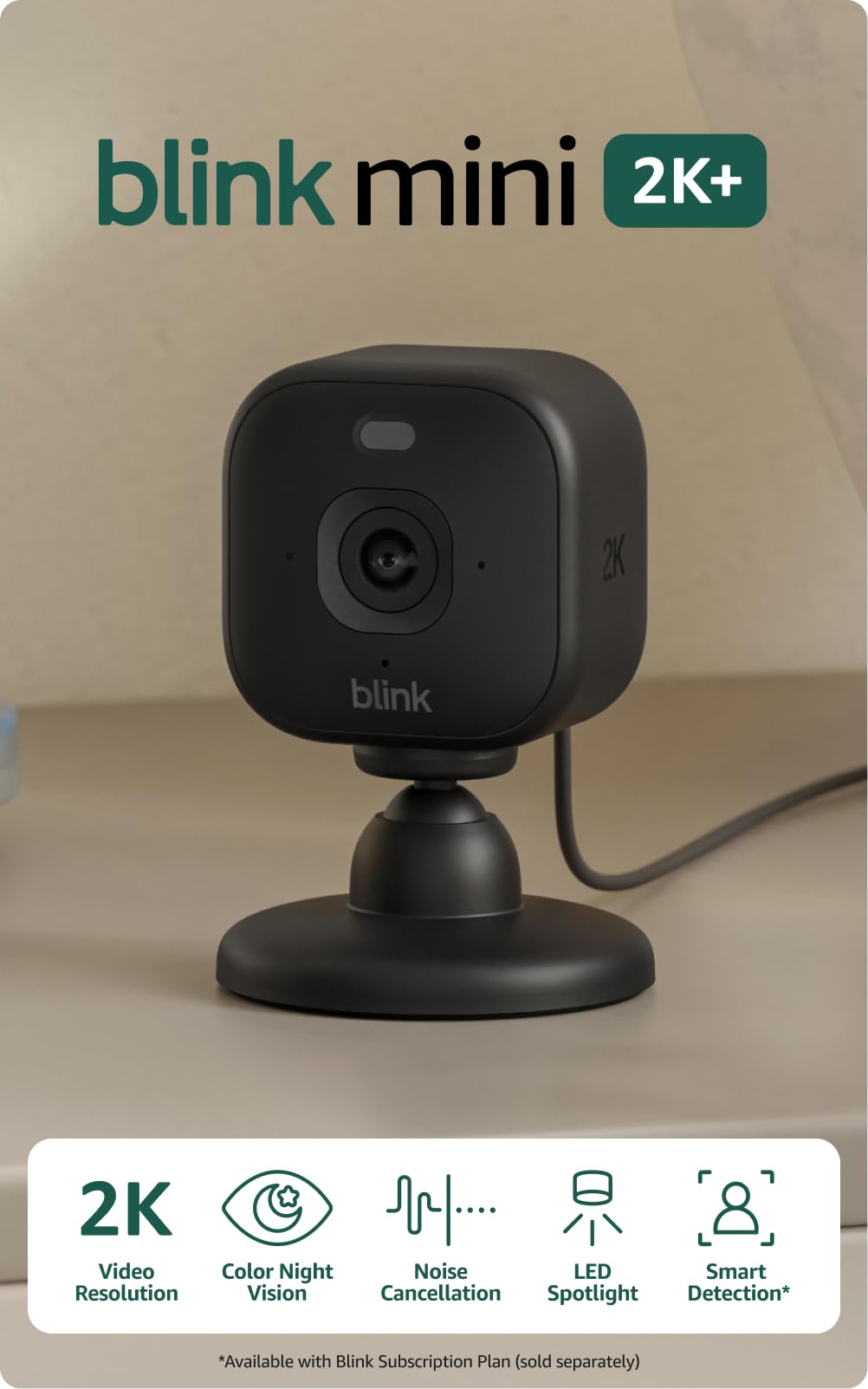
Enhance Your Home Security with Blink Indoor and Outdoor Cameras

Enhance Your Home Security with Blink Indoor and Outdoor Cameras

You want a home security setup that is dependable, easy to manage, and matched to your space. Blink’s mix of outdoor battery cameras and compact plug-in indoor models gives you options for long-range perimeter coverage, high-resolution close-ups, and full-room monitoring with pan and tilt. Comparing these models helps you pick the camera that saves you time, reduces false alerts, and gives you clear video and two-way audio when it matters most.

Top Picks

Category

Product

Score

🔋 Best Battery Life

Blink Outdoor 4

86/100

🎯 Best Close-Up Clarity

Blink Mini 2K+

88/100

🔄 Best Room Coverage

Blink Mini Pan-Tilt

90/100

🚀 Best Long-Range Coverage

Blink Outdoor XR

83/100

Selection Criteria

You need cameras that match how and where you plan to use them, so we weighed five practical factors. Video quality and field of view determine whether you can identify faces and license plates.

Power type and battery life matter if you cannot run wiring, while plug-in models remove the maintenance of swapping cells. Range and Sync Module compatibility matter for larger properties, and pan-tilt capability changes how many devices you need to cover a room.

We also considered ease of setup in the app, included accessories, weather resistance for outdoor units, and the ongoing cost and convenience of cloud storage.

🔋 Best Battery Life

Blink Outdoor 4

Wireless outdoor security camera kit with up to two-year battery life, 1080p HD day and infrared night vision, two-way audio, and Sync Module Core included in a two-camera system.

This two-camera Blink Outdoor 4 kit is built to be low maintenance and reliable. You get 1080p day video and infrared night view so you can check driveways, yards, and entry points without squinting at grainy footage. The advertised two-year battery life means you spend less time swapping cells and more time actually using the system. Setup is straightforward in the Blink Home Monitor app, and the included Sync Module Core helps keep cameras connected so you can add more later.

For everyday use you can monitor deliveries, watch pets outside, or keep an eye on landscaping projects, and for occasional needs like hosting a party or leaving town the long battery life and two-way audio give flexible, hands-off coverage. If you want an outdoor camera that stays out of your routine while still delivering clear video and simple controls, this one is a practical choice.

Ease Of Use

Feature

Ease Level

Setup

Easy

App Controls

Easy

Mounting

Easy

Battery Replacement

Moderate

Connectivity Range

Moderate

Indoor/Outdoor Use

Designed for outdoor use, this model handles a wide temperature range and comes with mounting kits for porches, eaves, and poles. Because it’s battery powered you can place it where wiring would be difficult, and it also works fine in covered indoor spots if you want discreet monitoring inside.

Key Benefits

  • Very long battery life cuts down on maintenance
  • 1080p day and infrared night video for clear identification
  • Sync Module Core included for easier connectivity and expandability
  • Two-way audio and compact, discreet design for versatile placement

Rating: 4.2 (total: 25696+)

Shop Now

🎯 Best Close-Up Clarity

Blink Mini 2K+

Plug-in indoor security camera with 2K resolution, night vision, enhanced audio, and motion detection. Sold as a two-camera kit for home and pet monitoring.

This Blink Mini 2K+ kit is built around simplicity and clear footage, so you can actually see faces and small details without fuss. Because it’s plug-in, you don’t worry about batteries and the camera stays powered for continuous monitoring.

The app walks you through setup quickly, and the sharper 2K image makes it ideal for entryways, nurseries, or a desk area where you want crisp close-up views. For everyday use you can catch package drops and keep an eye on pets, and for special occasions like hosting guests or watching a babysitter you’ll appreciate the reliable image and two-way audio.

If you want a low-maintenance indoor camera that prioritizes clarity and ease, this one is a solid pick.

Ease Of Use

Feature

Ease Level

Setup

Very Easy

App Controls

Easy

Mounting

Easy

Power Management

Very Easy

Connectivity Stability

Moderate

Indoor/Outdoor Use

Designed for indoor use only, this plug-in camera excels in living rooms, nurseries, and home offices. It’s compact enough to tuck on a shelf or mount near a doorway, but it’s not weatherproof so avoid outdoor placement.

Key Benefits

  • 2K resolution for clearer close-up detail
  • Plug-in power for uninterrupted monitoring
  • Fast, straightforward setup in the Blink app
  • Compact design suited for shelves, counters, and desks

Rating: 4.4 (total: 2747+)

Shop Now

🔄 Best Room Coverage

Blink Mini Pan-Tilt

Rotating plug-in indoor camera with 1080p HD day/night video, pan and tilt for near 360° coverage, motion detection, two-way audio, and Alexa compatibility.

You get a lot of coverage from a single device with the Mini Pan-Tilt. The camera lets you sweep a room left to right and tilt up and down from the app, so you don’t need multiple cameras to watch every corner.

Video quality is solid for daily checks on pets, kids, or a home office, and the night view keeps things useful after dark. Motion tracking and alerts help you follow movement without constantly monitoring the feed, and two-way audio makes it easy to communicate with someone in the room.

It plugs into power so you won’t worry about batteries, and it plays nicely with Blink’s app and Alexa for hands-free viewing. If your goal is full-room awareness with minimal fuss, this is a sensible, adaptable choice.

Ease Of Use

Feature

Ease Level

Setup

Very Easy

Pan-Tilt Control

Easy

App Controls

Easy

Mounting

Easy

Connectivity Stability

Moderate

Indoor/Outdoor Use

This model is built for indoor spaces only. It’s ideal for living rooms, nurseries, and home offices where you want full coverage without installing multiple cameras.

Avoid placing it outside since it isn’t weatherproof.

Key Benefits

  • Pan and tilt provide wide, near-360° coverage from one camera
  • 1080p HD day and night video for reliable visibility
  • Two-way audio for quick check-ins and simple communication
  • Plug-in design removes battery maintenance and supports continuous use
  • Motion tracking reduces the need to watch live feeds constantly

Rating: 4.5 (total: 20269+)

Shop Now

🚀 Best Long-Range Coverage

Blink Outdoor XR

Six-camera Outdoor 4 XR kit with Sync Module XR for long-range wireless connections, up to two-year battery life, 1080p HD day/night video, and two-way audio.

If you have a large yard, long driveway, or outbuildings, this XR kit is built for that spread-out setup. The Sync Module XR extends the wireless reach so cameras stay connected at distances that standard modules struggle with, which means you can cover far-off gates and detached garages without lots of wiring.

Daily use includes monitoring entries, watching vehicles, and keeping an eye on landscaping work. For special situations like a backyard gathering or a week away from home, the multi-camera kit gives broad coverage so you don’t have blind spots.

Expect a slightly more involved setup than a single plug-in camera, but once it’s in place you get consistent range and low-maintenance battery operation that fits a bigger property.

Ease Of Use

Feature

Ease Level

Setup

Moderate

Range & Connectivity

Easy

Mounting

Easy

Battery Replacement

Moderate

App Controls

Easy

Indoor/Outdoor Use

Designed for outdoor deployment across a range of temperatures, the kit includes mounts and batteries so you can place cameras on eaves, poles, and exterior walls. It can work in covered indoor locations, but it’s optimized and weatherproofed for exterior use.

Key Benefits

  • Extended wireless range for large properties
  • Six-camera kit covers multiple perimeter points
  • Long battery life reduces maintenance visits
  • 1080p day and night video with two-way audio
  • Sync Module XR simplifies adding remote cameras

Rating: 4.2 (total: 4190+)

Shop Now

FAQ

How Long Do Blink Outdoor Camera Batteries Last And How Should You Maintain Them?

Blink Outdoor cameras use two AA 1.5V lithium metal batteries and the Outdoor 4 models advertise up to two years of battery life under default settings. Actual life depends on your motion settings, how often you view live streams, clip length, and temperature, so expect variance in real use.

To stretch battery life, reduce unnecessary motion clips, shorten clip length, and avoid frequent live view sessions. Use high-quality lithium AA cells and keep spare batteries on hand so you can swap them quickly when needed.

Do You Need A Subscription To Save Video Clips And What Are Your Alternatives?

Blink offers a cloud subscription that keeps video clips for longer retention—plans allow stored clips for up to 60 days—so if you want archival access beyond the trial window a subscription is the straightforward option. Without a subscription you still receive motion alerts and can view live feeds and recent clips, but long-term storage is limited, so download important clips to your phone right away.

Consider routinely exporting or backing up critical footage to your device if you prefer not to subscribe; treating the subscription as a convenience for hands‑off, longer retention is a practical approach.

Will Blink Cameras Work On A Large Property And How Do You Improve Connectivity?

If you have a big yard or detached buildings the Sync Module XR kit is designed for extended wireless reach, with advertised open-air ranges that outperform the standard module, but walls and terrain reduce range. For best performance place the Sync Module near the center of your camera cluster, keep it elevated and away from large metal obstructions, and test camera placement before final mounting.

If you still see connectivity gaps, add additional sync modules or move the cameras closer to the module; using the Blink app to check signal during setup helps you find the sweet spot.

What Customers Prefer

You typically prioritize where the camera will be used and how much maintenance you want: for outdoor perimeter coverage you favor long battery life and extended range, while indoor users prefer plug-in models with sharper close-up detail or pan-tilt flexibility. Ease of setup and ongoing maintenance often decide between the battery-powered Outdoor 4, the plug-in Mini 2K+, and the Mini Pan-Tilt.
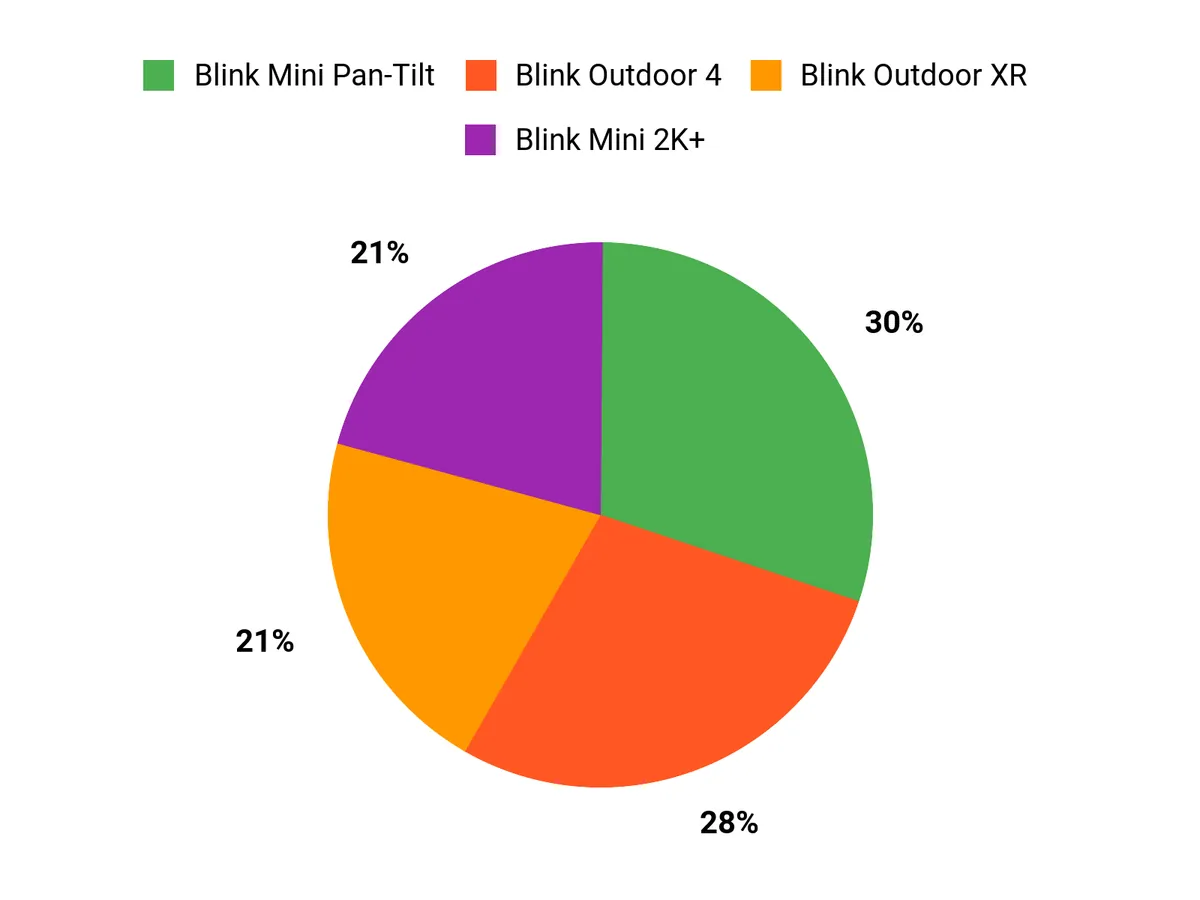
What Customers Prefer Chart

Wrapping Up

Choose the Outdoor 4 if you want a compact, battery powered outdoor camera with strong two-year battery claims and straightforward setup. Pick the Outdoor XR system when you need multi-camera coverage across a large property and a Sync Module with extended range.

Opt for the Mini 2K+ if you prefer plug-in indoor cameras with sharper close-up detail and minimal maintenance. If you want to monitor an entire room from one device, the Mini Pan-Tilt delivers the most flexible coverage.

Pair any camera with Blink’s app and a storage plan that fits how long you want to keep important clips, and you will have a security setup that balances cost, coverage, and convenience.

Product Name Image Rating Camera Resolution Field of View Battery Life Included In The Box
Blink Outdoor 4
Product Image
4.2/5 (N reviews) 1080p HD video 143° diagonal Up to two years
  • 2 Outdoor 4 cameras
  • Sync Module Core
  • Power Adapter
  • USB-C Cable
  • 4 AA lithium metal batteries
  • 2 mounting kits
Blink Mini 2K+
Product Image
4.4/5 (N reviews) 2K (2560 x 1440) 138° diagonal N/A (Plug-in)
  • 2 Blink Mini 2K+ cameras
  • 2 stands
  • 4 mounting screws
  • 2 indoor power adapters
  • 2 indoor USB-C cables
Blink Mini Pan-Tilt Camera
Product Image
4.5/5 (N reviews) 1080p HD video 110° diagonal (Pan-tilt: 350° / 125°) N/A (Plug-in)
  • 1 Blink Mini
  • 1 Pan-Tilt Mount
  • 1 USB cable
  • 1 power adapter
Blink Outdoor 4 XR
Product Image
4.2/5 (N reviews) 1080p HD video 143° diagonal Up to two years
  • 6 Outdoor 4 cameras
  • Sync Module XR
  • USB-C cable
  • Power adapter for XR
  • 12 AA lithium metal batteries
  • 6 mounting kits

Comments

Popular posts from this blog

Why Unencrypted DNS Still Rules and How You Can Break Free

Ever stumbled across a detail online that made you stop mid-scroll, like learning that the majority of your internet queries are still open to prying eyes? For years, I assumed the modern web meant modern privacy. Then, a coffee shop chat with a network engineer friend turned my assumptions upside down: "Most folks have HTTPS, but their DNS is still as open as a library book." That revelation hit hard. In today’s data-driven world, understanding how your DNS traffic is handled—and how to encrypt it—might be the most overlooked privacy step. Here’s what’s really going on, and how you can (finally) take control. The Curious Case of Unencrypted DNS: Why It Still Dominates In an era where HTTPS is nearly universal and most web traffic is encrypted, it’s surprising how many people still rely on unencrypted DNS. This creates real DNS privacy risks, exposing users to ISP DNS monitoring and ...

4 Essential Natural Gas and Carbon Monoxide Detectors Reviewed

4 Essential Natural Gas and Carbon Monoxide Detectors Reviewed You depend on gas-powered appliances and enclosed spaces every day, which makes knowing how to detect leaks essential to keeping yourself and your household safe. This roundup looks at reliable plug-in and portable detectors that combine multiple sensors so you don’t need separate devices for gas, carbon monoxide, temperature and humidity. Choosing a trusted 4-in-1 Upgraded Natural Gas Leak Detector and Carbon Monoxide Detectors can give you continuous monitoring, faster alerts, and clearer readouts so you can act quickly if a problem arises. In this guide, you’ll find concise pros and cons for each model and practical reasons why these features matter to you. Top Picks Category Product Score 🏆 Best Overall NICGOL 4-in-1 Upgraded Natural Gas Leak Detector and Carbon Monoxide Detectors (Black) — $31.29 95/100 💰 Best Value Nsrrye 4-in-1 Carbon Monoxide Detector / 1Pack (White) — $2...

4 Best Color Printers for Vibrant and Efficient Printing

  4 Best Color Printers for Vibrant and Efficient Printing Choosing the right printer is essential for anyone who values high-quality prints, whether for personal use or professional projects. A good color printer can enhance your documents, photos, and presentations, making them more vibrant and engaging. By investing in a reliable printer, you can save time and money in the long run, as well as enjoy the convenience of printing from home. In this article, you will discover four of the best color printers available, each designed to meet different needs and budgets. Top Picks Best Overall : HP OfficeJet 8015e Wireless Color All-in-One Printer Best Value : Epson EcoTank ET-2800 Wireless Color All-in-One Printer Best for Small Businesses : Canon Color imageCLASS MF652Cw - Wireless Laser Printer Best for Home Use...

Future of Technology and Computers

- In recent years, technology has made incredible advances and continues to shape the world we live in. Computers have played a major role in this progress and have revolutionized the way we live, work, and communicate. From desktops to laptops, from cell phones to smartwatches, computers have become an integral part of our daily lives. In this blog, we'll take a look at the future of technology with computers and what we can expect in the coming years. Cell Phones and Laptops Cell phones and laptops are two of the most widely used computer devices today. As technology continues to advance, we can expect these devices to become even more powerful and versatile. For example, cell phones are becoming increasingly more capable of handling complex computing tasks and are being used for more than just making calls and sending messages. In the future, we can expect cell phones to be used for virtual reality and augmented reality experiences, as well as for advanced gaming and entertainme...

Beginner’s Guide to Programming

 -The Beginner’s Guide to Programming Table Of Contents   Chapter 1: Understanding Programming Concepts And How They Work Chapter 2: Techniques Of Writing A Program  Chapter 3: The List Of Programming Languages  Chapter 4: How To Choose The Right Compiler  Chapter 5: What Is An Interpreter  Chapter 6: Writing Your Program With An Editor  Chapter 7: The Functions Of A Debugger  Chapter 8: Ease Your Burden With Components  Chapter 9: Optimizing Your Program With Profiler  Chapter 10: Installing Your Program. Wrapping Up   Foreword  There are several different concepts that an individual needs to understand before being able to tackle the issue of programming concepts and how they unfold.  Introduction: Programming is the act of designing, writing, testing, and maintaining the source code for computer programs.  Programming is a field that requires knowledge in mathematics, logic, sciences, and engineering.  Th...

Spyware Removal Tricks and Advice

-Spyware Removal Tricks and Advice Contents Chapter 1 What is Spyware?  Chapter 2 How is Spyware different from  Viruses &Worms? Chapter 3 Can I Just Ignore Spyware?  Chapter 4 What Damage Can Spyware Do?  Chapter 5 How does Spyware Get onto Your Computer?  Chapter 6 How to Prevent Spyware  Chapter 7 What is Antispyware & How Does it Work?  Chapter 8 Can I Use “All-Around” Computer Security Software?  Chapter 9 Free Antispyware Software  Chapter 10 Rogue Antispyware Software  Chapter 11 Choosing Antispyware Software Chapter 12 Do You Need to Update Antispyware?  Chapter 13 How to Get Rid of Spyware  Chapter 14 Spyware Removal in Safe Mode  Chapter 15 Manual Removal of Spyware  Chapter 16 Manual Spyware Removal without Instructions  Chapter 17 Combating Browser Hijackers  Chapter 18: Spyware that Prevents You from Running Antispyware  Chapter 19 Spyware that Prevents You From Starting in Safe Mod...

Best Cell Phone Review 2023

- The world of smartphones is constantly evolving, with new models and features being released every year. This can make it challenging to decide on the best cell phone for personal use. However, there are certain brands and models that stand out as the best options for most people. Here is a list of the best cell phones for personal use in 2023. iPhone 12 Pro Max: Apple's latest iPhone is a top-of-the-line device that offers an impressive array of features and a sleek design. The Pro Max model boasts a large 6.7-inch OLED display, a powerful A15 Bionic chip, and a triple-camera setup that includes a 12-megapixel ultra-wide, wide, and telephoto lenses. With 5G support and excellent battery life, this is a great choice for anyone looking for a high-end smartphone. Samsung Galaxy S21 Ultra: Samsung's latest flagship smartphone offers cutting-edge technology and a large, high-resolution display. The S21 Ultra features a 6.8-inch Dynamic AMOLED screen, 5G support, and a powerful Ex...

Computer Technology Overview

- Computer Technology: An Overview of Laptops, Desktops, Tablets, and Cell Phones Computer technology has come a long way since its inception. The modern world is now dominated by a wide range of computing devices, from laptops and desktops to tablets and cell phones. These devices have transformed the way we live, work, and interact with each other. In this blog, we'll take a look at the different types of computer technology and how they've evolved over the years. Laptops: Portable Powerhouses Laptops are the most versatile computing devices. They offer the convenience of a desktop computer and the portability of a tablet. Over the years, laptops have become smaller, lighter, and more powerful, making them the perfect device for people on the go. Today, laptops are equipped with high-end hardware and software, making them suitable for tasks such as video editing, gaming, and even scientific research. Desktops: The Workhorses Desktops are traditional computing devices that hav...

Mac vs Windows OS

- The Mac operating system (OS) and Windows OS are two of the most popular operating systems in the world, used by millions of people every day. Although they both perform the same basic functions, there are several key differences between the two that set them apart from one another. User interface: The most obvious difference between the two operating systems is their user interface. Mac OS has a cleaner, more minimalist look, with a focus on simplicity and ease of use. Windows OS, on the other hand, is more customizable, allowing users to personalize the look and feel of their system. Software compatibility: Mac OS is limited in terms of software compatibility, as it only runs on Apple hardware and is limited to a smaller number of applications compared to Windows OS. Windows OS, on the other hand, is much more versatile, allowing users to run a wider range of software and hardware. Hardware: Mac OS is only available on Apple hardware, while Windows OS can be installed on a wide ran...

Buying Refurbished Computers. What you need to know.

-Buying Refurbished Computers Refurbished products are those that have been fixed or repaired and sold to consumers at a lower price than new products. Refurbished goods help the environment because it means less wasted materials and less energy used. Refurbished computers come with all the same parts as a new computer, but they may also be missing some of the extras like a mouse or keyboard. Refurbished electronics can include anything from MP3 players to microwaves. When buying refurbished items, make sure to check what is included in the package before you buy it. They are a great way to save money and help the environment because these devices can be recycled at the end of life. The biggest difference between used, open-box, and refurbished is that refurbished products come with a warranty in some cases, or in some cases, they might even come with new parts. The benefit of buying refurbished electronics is that you can purchase these items at low prices while still getting access t...